
Do you have funds on Coinbase and want to use them to buy crypto or cash out via BitcoinVN? This article provides a clear, step-by-step guide on how to buy crypto or cash out from Coinbase via BitcoinVN safely and easily. Check it out!
Before you begin
Please note that transaction processing times on BitcoinVN can range from near-instant to several minutes or, in rare cases, longer (the latter is most commonly observed on the Bitcoin blockchain, which prioritizes conservative security guarantees over raw on-chain throughput, particularly during periods of network congestion).
If you have any questions or encounter issues during your transaction, please contact our support team at [email protected] or join the discussion in our Telegram community: https://t.me/bitcoinvn_community.
How to buy crypto or cash out from Coinbase via BitcoinVN
How to use Coinbase to buy crypto via BitcoinVN
For example, let’s say you have USDT on Coinbase and want to use it to buy Bitcoin on BitcoinVN. Please visit BitcoinVN and follow the guide below:
- Step 1: In the “You Send” section, select USDT. Choose the correct network for your USDT. For example, if you have USDT (TRC20) on Coinbase, you must select USDT (Tron) on BitcoinVN.
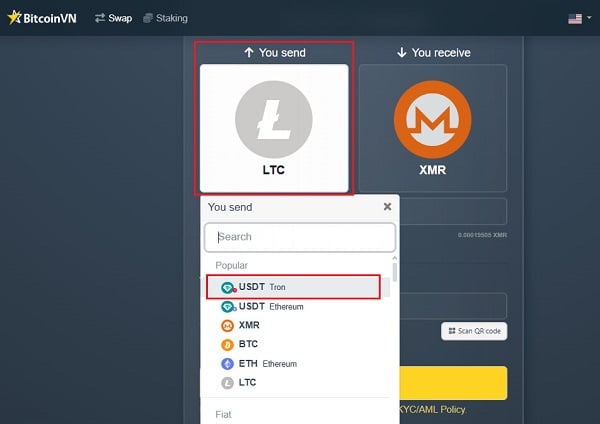
- Step 2: In the “You Receive” section, select Bitcoin.
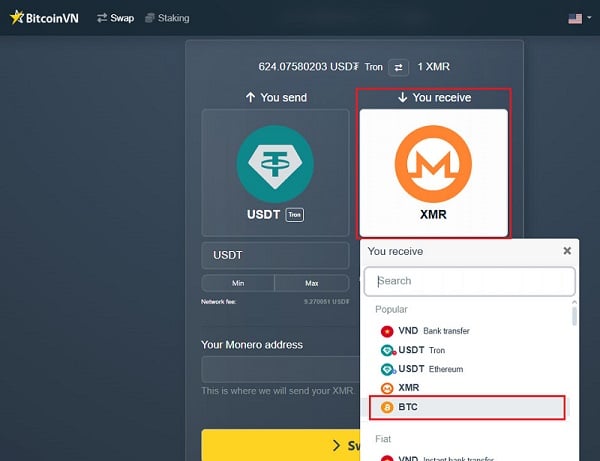
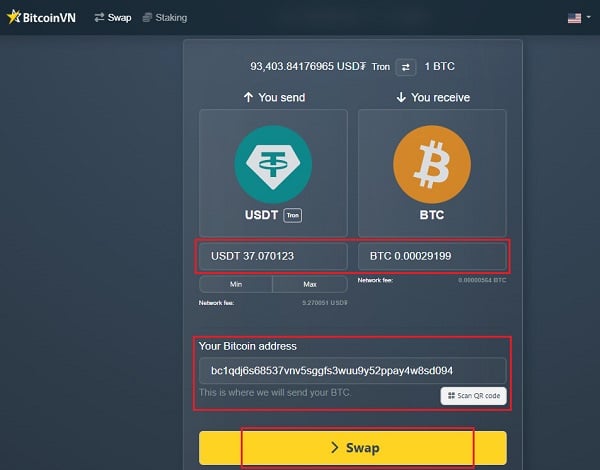
- Step 3: Enter the amount of USDT you want to spend or the amount of Bitcoin you wish to buy. The corresponding amount will automatically be displayed. Next, enter your recipient wallet address and click “Swap” to submit your transaction request.
- Step 4: You will see a QR code and deposit instructions on the screen to send your funds.
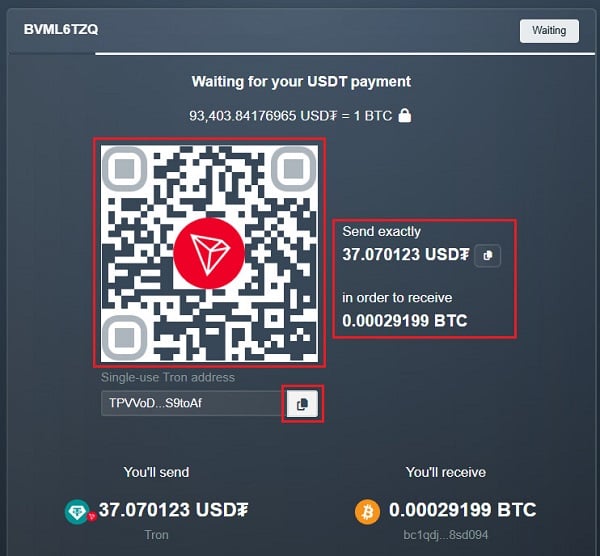
- Step 5: Open the Coinbase exchange (if you store your funds there – though we do not recommend keeping funds on exchanges) or your Coinbase Wallet. Scan the QR code or copy and paste the provided deposit address. Then, transfer the exact amount shown on the screen.
Note: Once you complete the transfer, the transaction will be processed. However, please keep in mind that some blockchains rely on “confirmation time” (network confirmation by miners / validators), so it may take a little while for your Bitcoin to arrive. We appreciate your patience!
How to use Coinbase to cash out via BitcoinVN
To make it easy to understand, let’s say you are holding USDT on Coinbase and you want to cash out via BitcoinVN. Please visit BitcoinVN and follow the guide below:
- Step 1: In the “You Send” section, select USDT. Please select the right network for your USDT. If you hold USDT (TRC20) on Coinbase, choose USDT (Tron) on BitcoinVN.
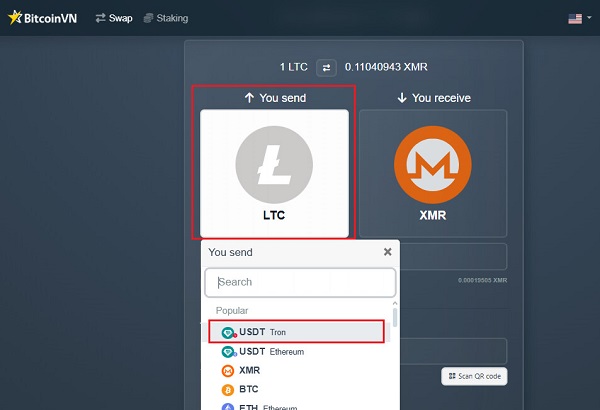
- Step 2: In the “You Receive” section, select VND Bank Transfer or VND instant transfer (which will generally settle within seconds). You can also choose to pick up cash at our offices in Ho Chi Minh City, Da Nang, or Hanoi (please check if our office locations are convenient for you). In this guide, we will focus on withdrawing to a Vietnamese local bank account.
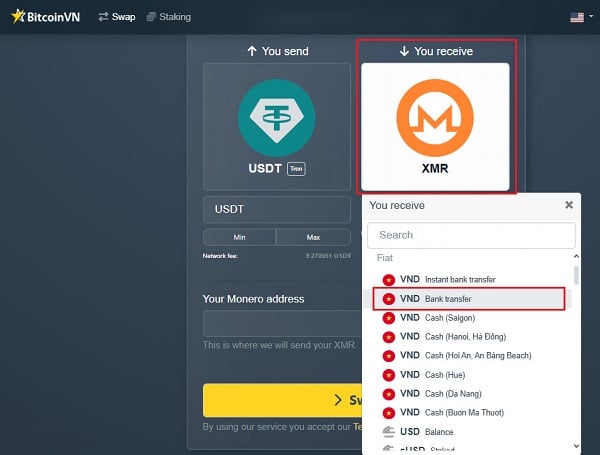
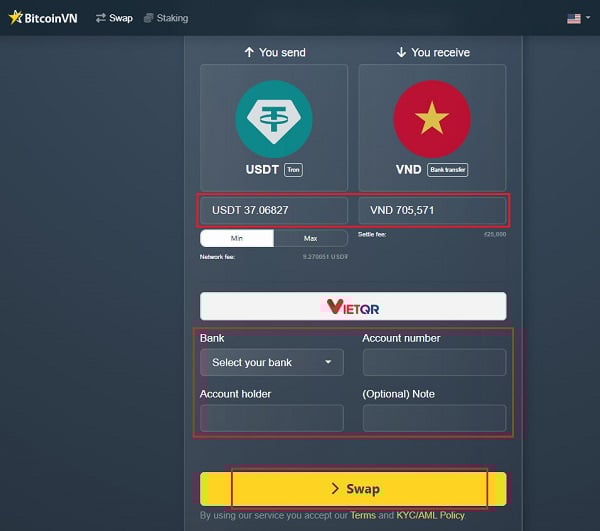
- Step 3: Enter the amount of USDT you wish to cash out. The corresponding VND amount will be displayed automatically. Then, enter your bank transfer details and click “Swap” to submit your transaction request.
- Step 4: A QR code and deposit instructions will appear on your screen.
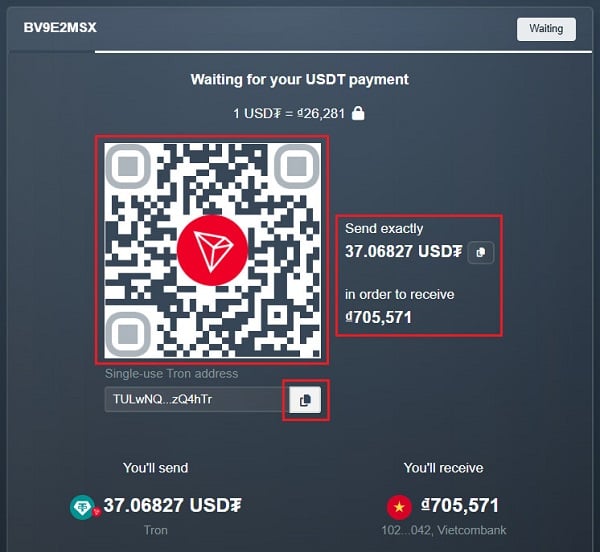
- Step 5: Open the Coinbase exchange (if you store your funds there – though we do not recommend keeping funds on exchanges) or your Coinbase Wallet. Scan the QR code or copy and paste the provided address. Then, transfer the exact amount shown on the screen.
Note: Once you complete the transaction to exchange for VND, it will be processed almost instantly. However, please note that bank delays or congestion may occasionally cause a wait of a few minutes. We appreciate your patience!
Important notes when trading via BitcoinVN
- Ensure network compatibility: Make sure you select the correct blockchain network for your coins/tokens. For example, if your USDT is on the Tron network (TRC20) in Coinbase, you must select USDT (Tron) on BitcoinVN. If you choose the wrong network, you might lose your money.
Remember: crypto transactions cannot be reversed. Be very careful!
- Check the website and avoid scams: Always make sure you are on the official BitcoinVN website. Double-check the website link (URL) and the wallet address before you send money. Only trade when you want to, and don’t let others pressure you into sending money!
- Check the fees: Always look at the transaction fees first. Make sure you are happy with the cost before you decide to buy or sell.
Understand the risks: If you are a beginner, please know that crypto prices can go up and down very fast. Never invest all your money. Only invest an amount that you are okay with losing. Be a smart investor!