
Are you planning to buy some Sats on BitcoinVN and have it sent to your Blink wallet? This article will walk you through each step clearly, while helping you stay safe and secure throughout the process.
To buy Bitcoin on BitcoinVN and send it to your Blink wallet, follow the steps below. In this example, we use USDT (Tron) to buy BTC via Lightning.
- Step 1: Go to the BitcoinVN exchange.
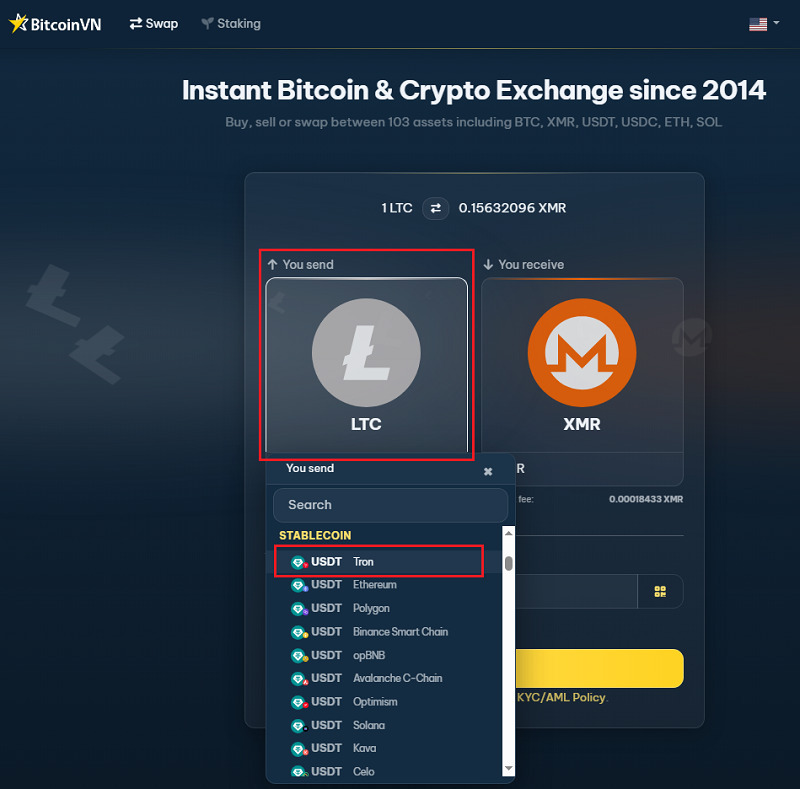
- Step 2: In the “You send” section, select USDT (Tron) as the asset you want to use. Please also make sure to select the correct network (chain) for the coin you are holding.
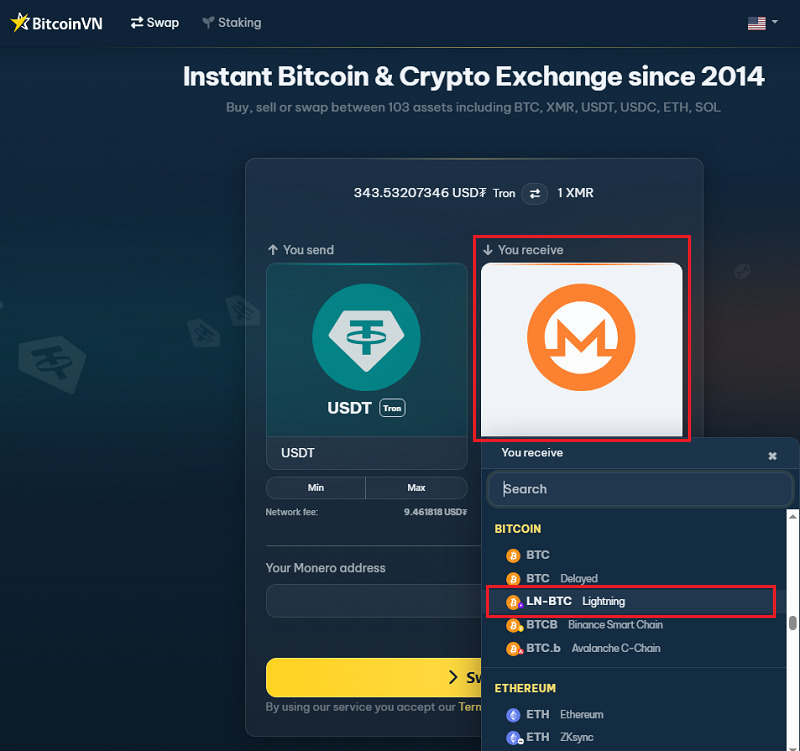
- Step 3: In the “You receive” section, choose BTC (Lightning).
- Step 4: Enter the amount you want to convert, then provide your Blink wallet Lightning address (or scan the QR code from your Blink wallet). If you don’t know how to get a Lightning address on your Blink Wallet, please refer to the instructions below.
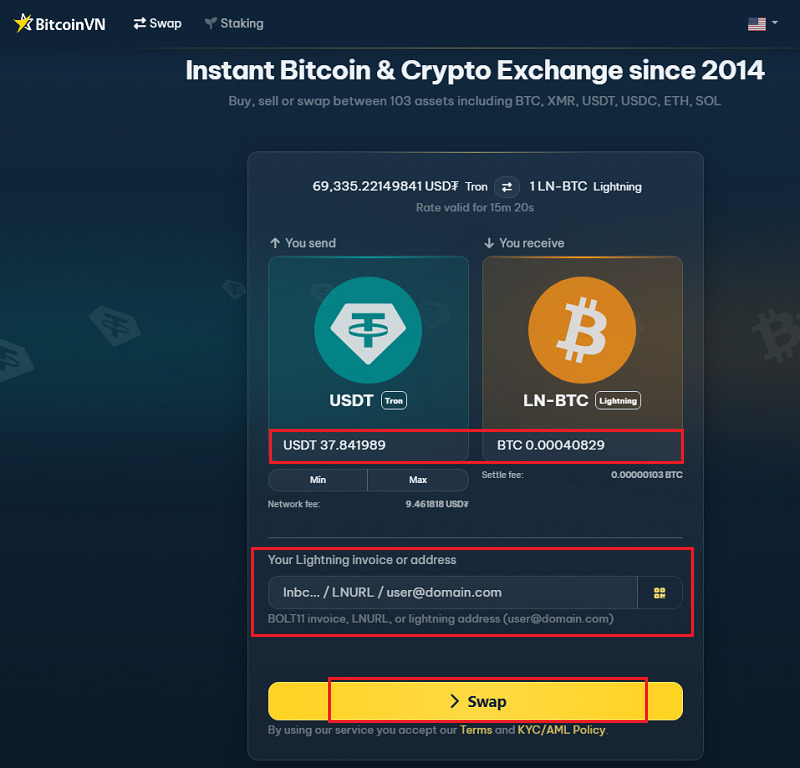
- Step 5: Review the details, then follow the payment instructions shown on screen. Once your payment is confirmed, the BTC should arrive in your Blink wallet within seconds.
How to get your Lightning address on Blink Wallet?
To receive Bitcoin via Lightning, you can use either a Lightning invoice or a Lightning address. Blink lets you create a Lightning address easily.
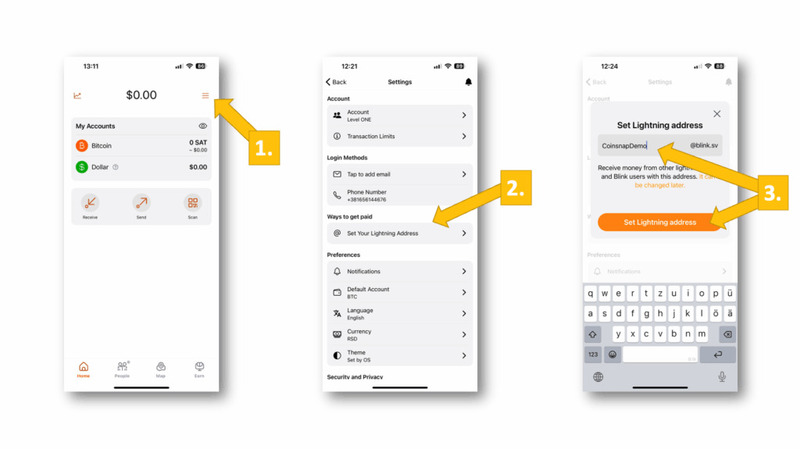
- Open the menu, then select “Set Your Lightning Address”
- Under “Ways to get paid.” In the pop-up, enter your preferred name (for example, “CoinsnapDemo”)
- Then click “Set Lightning Address”.
Once done, you’ll have your own Lightning address and can start receiving payments right away.
About Blink Wallet
Blink Wallet is more than just another Bitcoin wallet. It was built with a clear mission: to make Bitcoin – especially Bitcoin over Lightning – simple enough for everyday people to use in the real world.
Rather than focusing on advanced features for power users, Blink has positioned itself as an onboarding (“orange-pilling”) tool – a wallet designed to help new users receive, hold, and spend Bitcoin with as little friction as possible. This approach has made it especially attractive in developing markets, where people need something practical, fast, and easy to understand from day one.
Key features include:
- Fast transactions: Send and receive BTC in seconds using Lightning
- Reliability: Built to make everyday Bitcoin payments smooth and dependable
- Simple design: Clean and user-friendly interface on mobile
For BitcoinVN users, Blink is a practical wallet choice because it makes receiving BTC via Lightning quick and straightforward – a good fit for anyone looking to move from simply buying Bitcoin to actually using it.
Why choose BitcoinVN?
- Long-standing operator in the Bitcoin space: BitcoinVN has been serving as Bitcoin exchange infrastructure provider since early 2014 and has built a reputation as one of Asia’s most reputable Bitcoin service providers.
- Practical Lightning support: BitcoinVN makes it straightforward to swap into Sats and send them directly to a Lightning wallet such as Blink – no sign-up required, with minimal friction.
- Useful bridge into actual Bitcoin use: For users holding other crypto assets such as stablecoins, the platform offers a simple path to move into Bitcoin and immediately put it to use over Lightning.
While the BitcoinVN swap platform supports a wide range of crypto assets, the team behind it consists of committed Bitcoiners who have been investing in the ecosystem for years, supporting fellow Bitcoin infrastructure builders and operating one of Asia’s largest Lightning routing node operations.